Diffusers Pipelines Generate Images with Generative AI in Python
Aug 13, 2026

Introduction
I have seen beginners spend hours trying to build an image generation system from scratch. Usually, they do not need to. Python libraries have already simplified much of the difficult work. One popular option is the Diffusers library. Its pipelines allow developers to generate images using only a few lines of Python code. Beginners can join Python with AI Course for the best hands-on learning experience in this field.
What Is a Diffusers Pipeline?
Pipelines are ready-to-use workflows. They help run an image generation model. Pipelines connect the major parts required to turn aa text into an image.
For example, a text-to-image pipeline takes a prompt such as:
"A modern office in Mumbai with large glass windows"
The model then generates an image according to that description.
Developers do not need to manually manage every internal step. The pipeline can handle tasks like:
· model loading
· input processing
· image generation
· output handling
The Diffusers library is used with the models available through Hugging Face. Developers can select a suitable model. They load it directly into a Python application.
Setting Up a Basic Image Generator
Beginners can start with the Diffusers package and a compatible deep learning framework such as PyTorch.
A simple example looks like this:
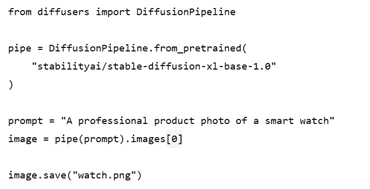
· The from_pretrained() method loads a previously trained model.
· The prompt describes what the developer wants to generate.
· Then pipe(prompt) runs the pipeline.
That is the part that often surprises beginners. A complex generation workflow can be called almost like a normal Python function. An AI Course in Gurgaon can explain how Diffusers pipelines connect Python applications with modern image generation models.
How the Pipeline Creates an Image
Text-to-image generation usually starts with a text prompt. The pipeline converts that text into information the model can understand.
The model begins with random visual information known as “noise”. It removes the noise and moves towards an image that closely matches the prompt. This process is called “diffusion”.
Users do not need to understand the mathematics before using it. Beginners need to first focus on the pipeline settings and prompt quality.
Some useful settings include:
· Prompt: Description of the desired image.
· Negative prompt: Tells the model what it should avoid.
· Number of inference steps: Controls the amount of processing the generation uses.
· Guidance scale: Controls how closely the output follows the prompt.
· Image dimensions: Defines the output size.
Changing these values can produce noticeably different results.
Where Businesses Can Use It
The practical applications are much broader than creating random artwork. In many projects, teams use image generation for early design work. A marketing team might create product concepts before sending them to a designer. An e-commerce company could experiment with lifestyle scenes for product presentations.
A software company might also use generated visuals for prototypes, landing pages, or internal presentations.
For example, a furniture business could generate several room settings around the same sofa. Designers can then decide which visual direction is worth developing further.
The key benefit is speed. Users no longer need to wait for every concept to be manually produced. They can test the ideas quickly.
Moving From Experiments to Applications
Once the basic pipeline works properly, developers can integrate it into the larger Python applications.
Web applications can accept a user's prompt and return a generated image. Internal business tools generate marketing concepts from the pre-defined templates. Developers can also expose generation through an API.
There are practical concerns, though. Image generation can require significant GPU memory. Model loading can also take time. In production, developers need to think about hardware, response time, storage, and usage limits.
I have seen projects work perfectly during development and struggle later because infrastructure requirements were ignored. A Generative Ai Course in Hyderabad can help learners understand text-to-image generation and practical business applications.
Conclusion
Diffusers pipelines make image generation much easier to approach with Python. Beginners can start with a pretrained model instead of building the entire workflow themselves. Businesses benefit because of faster experimentation and easier integration. One must start with a simple pipeline. Beginners are suggested to understand its settings. After mastering the basics, they can move towards a production-ready application.
FAQs
1.What is a Diffusers pipeline?
Diffusers pipeline is a ready-made workflow. It is used to generate images with Python.
2.Can beginners use Diffusers in Python?
Yes. Beginners can start with pre-trained models and simple Python codes.
3.What is needed to run Diffusers?
You need Python, the Diffusers library, PyTorch, and a suitable hardware.
4.Can Diffusers generate images from text?
Yes. Text-to-image pipelines generate images according to the written prompts.
5.Can businesses use Diffusers pipelines?
Yes. Businesses can use them for tasks like product concepts, prototypes, marketing visuals, creative experiments, etc.